


There is a new feature that is somewhat-hidden within the new Google AdWords interface that I want to bring to your attention. Now, you can essentially run a search query report at the ad group level without actually running a full-blown search query report to find additional keywords or negative keywords.
Just a refresher for some, negative keywords are keywords you can add into your PPC account that will prevent your ad from showing on. Example, if you have ‘shoes’ as a broad or phrase match keyword, Google will pick up other similar variations of ‘shoes’ and show your ad for search terms like ‘blue shoes’ or ‘kids shoe’s. You would want to add ‘blue’ and/or ‘kids’ as negatives if you dodn’t carry either of those.
Here are step-by-step instructions to finding and adding keywords within the new AdWords interface:
- Login to your Google Adwords account
- Select a campaign, then select an ad group
- Once you’re in the ad group, click on the keywords tab
- Check the box to the left of the keywords
- In the bar above the keywords, click the ‘See search terms’ drop down and click ‘all’ or ‘selected’
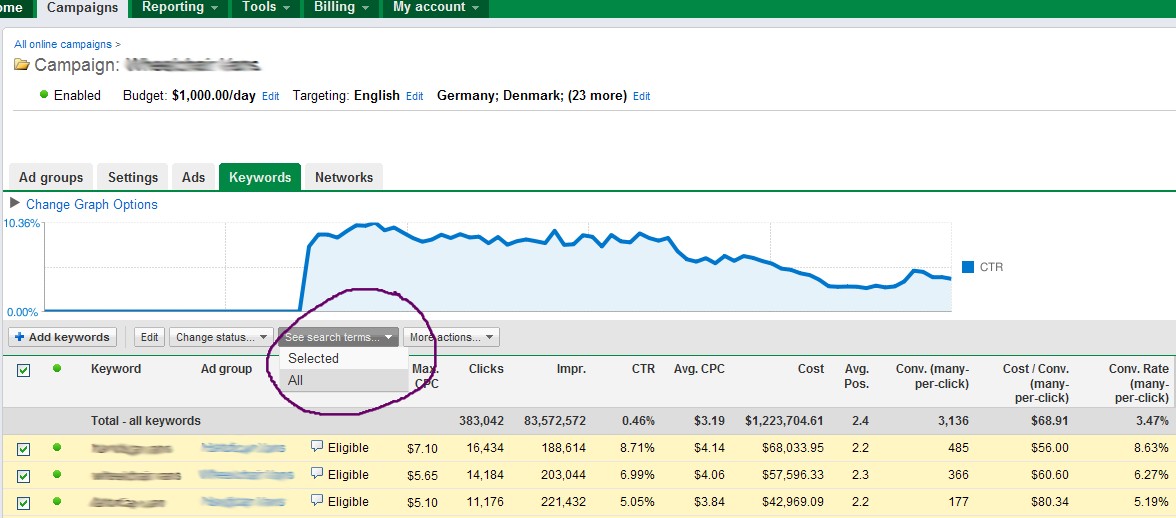
A box will appear over Google Adwords. Within this box are the actual search queries that displayed your ads, just like running a search query report for a particular ad group.
In this window, the keywords that are labled “added” are the terms that are already in hour account. The keywords that are not labeled ‘added’ are the searchqueries that do not exist in your ad group yet. You can see in the screen shot below, for each search query or keyword, you can view the impressions, clicks, CTR, spend, conversions, etc.
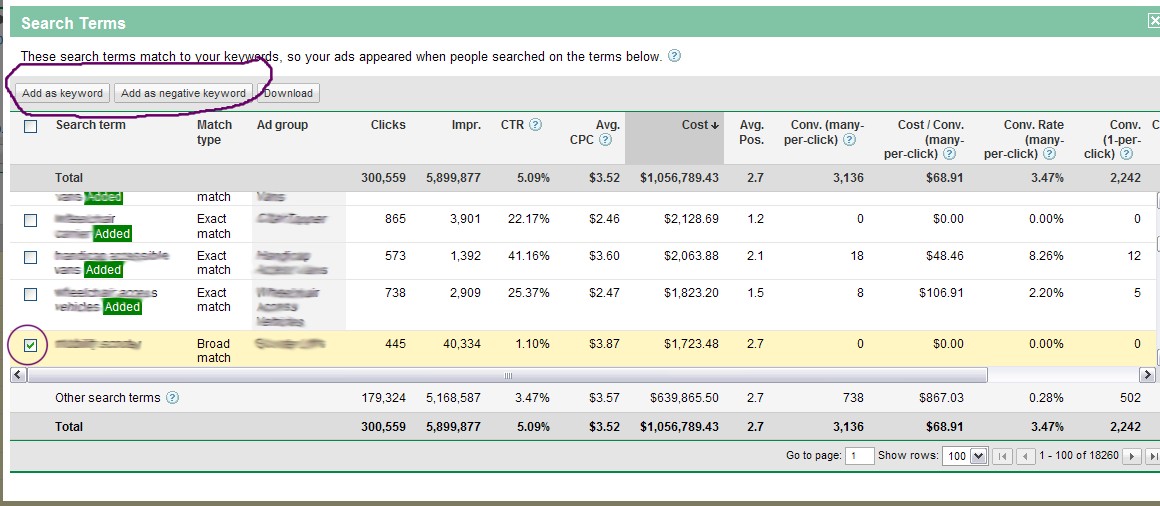
If you can search queries that are not relevant to your product/services, more-than-likely they are driving generating unqualified traffic. You can add these terms in as a negative keywords right from this window. Just click the box next to that particular keyword and click ‘Add as negative keyword’ at the top of the window.
In the opposite effect, if you want to add in a search query as an actual keyword, you can select that keyword by checking the box next to it, and click ‘Add as keyword’.
I think this is a really great and much easier way to find new keywords and negatives in Google AdWords. I’m glad Google AdWords is not withholding any information from us and is actually making it easier to identify potentially unqualified keywords.
