


Google AdWords and Yahoo Search Marketing comprise approximately 82% of search traffic. Therefore, we focus approximately 82% of our articles toward these two search engines, logically. Today, I am going to take a diversion and discuss optimizing your advertisements for Business.com.
Before you can enhance your listings, you have to know your core audience. As the name implies, Business.com is geared towards professionals looking for business solutions. It is a directory and pay-per-click network that serves approximately 40 million unique users every month. According to their company description, “Business.com helps business decision makers quickly find what they need to manage and grow their businesses, and enables advertisers to reach these users wherever they are across the business Internet through premier partners, including Forbes, BusinessWeek, Hoovers, Financial Times and Internet.com.” Basically, these individuals are looking for services and business solutions.
A Business.com search engine results page (SERP) is a mixed bag. The top of the page displays sponsored links for companies who are advertising directly with Business.com. The rest of the SERP is a blend of organic results, sponsored ads distributed by Google, and other Business.com sponsored links. If you are running a Business.com campaign; running ads within AdWords; and you rank organically, it is possible to have 3 more listings on a Business.com SERP. This means you can have a lot of realty on this site, but how do you make your Business.com sponsored ads work optimally? Here are some tips!
Have a well-thought-out campaign structure: As within any paid search campaign, you need to have a clean, logical account structure. Your campaigns should contain tightly themed keywords and highly targeted ad text.
Write relevant, compelling ad text: In order to craft relevant, compelling ad text you need to stick to the basics: make sure your keywords are highlighted within your ad (headline and body copy, if possible); include a clear call-to-action; and remember who your target audience is (individual looking for solutions). Remember, present your product & service as the solution the user is seeking.
Pay attention to your performance indicator: Performance Indicator reflects the performance of your listing relative to other advertisers bidding on the same keyword and your rank. If you have a low ranking then your ads may not be as compelling and relevant as possible. Revise your ads to increase your click-through rate (CTR) and your PI should increase.
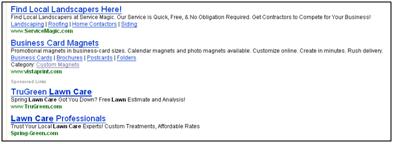
Utilize your mulitlink option: The feature that makes Business.com paid listings unique is the fact that you can include up to 5 links within your ad. Your headline is a link, and you can include 4 additional links at the bottom of your ad. Be sure to utilize this mulilink option as it can draw more attention to your ad; build more trust with users; and increase your CTR by up to 20% (on average). Here is an example of an advertiser who using these options; the first ads are Business.com sponsored ads that are using the multilink option:
As I stated earlier, Google and Yahoo own the lion’s share of search traffic, but that doesn’t mean you can’t devote some of your time and efforts to alternative search venues. Sure, Business.com will generate far fewer clicks and conversions, but this could be business that you’re leaving on the table by ignoring it.
