Google Automatic Matching Test Only Generated 1 Click!

Back in March I wrote a post on the new Google Adwords Automatic matching beta, as well as Joe my colleague wrote on the subject just last week. At the time none of my accounts qualified for the beta and I hadn’t quite formed an opinion of the new feature until now.

Last week I got an email from my Google rep. letting me know that one of my accounts has qualified for the beta, and although Google said it would be an automatic opt-in, it wasn’t. However, a large number of accounts are being automatically opted-in. To be safe I would double check your account either way. Since I was very interested in how this was going to work and what it was going to do to my traffic, PPC spend and overall revenue, I enabled the feature.

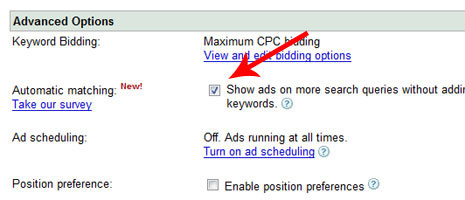
If you’re account is eligible for the new automatic matching all you have to do is go into your account campaign settings, in the advanced options settings there is a new option for Automatic Matching and all you have to do is check the box next to it that reads, ‘Show ads on more search queries without adding keywords.’
am1

I’ve had a full week in running the new feature and I’m sad to report I only received one additional click from the automatic matching test. However, when I ran a search query report to find the term that showed my ad through the automatic matching feature, it wasn’t a keyword I wanted to target, therefore costing me $.25 in an irrelevant click to my site.

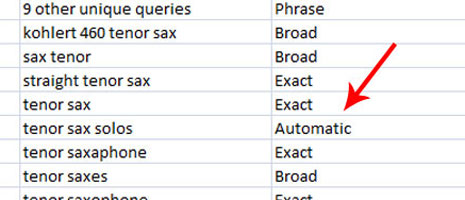
Now, this doesn’t necessarily mean that all automatic matching queries in the future will be irrelevant, however this particular test doesn’t give me much hope. The keywords in the ad group I was targeting were related to the sale of saxophone instruments. The search query Google showed my ad for was, ‘tenor sax solos’, which is related yes, but not something we sell, therefore irrelevant.

If you do have automatic matching enabled in your account, you can view the actual search query that displayed your ad and view stats on that particular search query.

Simply go to the reports section in your Adwords account. Create a search query report and select the specific campaign in which you have automatic matching set up for. Once the report downloads, the column titled ‘search query match type’ will display any search query for the automatic matching simply labeled, ‘automatic’.
am2

I questioned after running the test for a full week ,why I hadn’t received much traffic since I had my daily budget set to $500 when I normally only spend about $130 a day. I turned to the Google help section about the new automatic matching and read the following on why I hadn’t received much traffic. They mentioned that if you recently enabled the new automatic matching the system actually takes a short period of time to evaluate your campaign before it begins targeted relevant (or irrelevant!) search queries. They also mention additional reasons why you may not be getting much traffic yet:

  • Your campaigns already meet their daily budgets
  • Your keywords already capture the majority of relevant traffic
  • Our system is unable to access your website or to find significant text or content on your site
  • Your ad groups have a small number of ads with little information

The Google help section also notes that: Automatic matching currently has no effect on campaigns that use position preference or preferred cost-per-click (CPC) bidding.

You can view a complete list of frequently asked questions about Google’s automatic matching.

My initial thoughts, it’s not going to be as big as we all thought it might be in terms of driving additional traffic, whether relevant or irrelevant. However, since I’ve only been running the automatic matching test for one week and haven’t received much traffic from it, I plan to write again on the test in a week or two.

What have been your experiences with this new Adwords feature so far?

About the Author

Amber

Amber is a former Account Executive at Hanapin Marketing, a search engine marketing firm focused on generating results through pay-per-click advertising.
  • http://blog.ecairn.com dominic

    Hello, I’m curious.

    Have you tried to do placement targeting campaigns on blogs where people discuss saxophones or teach how to play saxophone?

    We’ve used this approach in the past and the click rate was generally quite good… still the conversion is a challenge !
    Converting someone that does not search is clearly a different game than converting a searcher :-)

  • http://www.portentinteractive.com Elizabeth

    According to my Google rep, while some accounts have been enabled with the new feature, it’s campaigns that are being automatically opted in and not the whole account. So in any given account (which is what happened to me) I had 10 campaigns automatically opted in and then 3 campaigns that weren’t.
    To add to the fun, some the campaigns that had been opted in and were listed as “enabled” on the ad group level, did not have the opt out checkbox in advanced options like it should have.
    In another client’s account a “Automatic Matching” link appeared on the campaign dashboard next to the “Edit Settings” link instead of being in the Advanced Options area.
    So far it’s been nothing but a time wasting frustration.

  • http://www.ppchero.com Amber

    @ Dominic

    I have not tried to add a placement targeted campaign to this account. It’s definitely worth looking into! Thanks for the tip!

    @ Elizabeth

    I haven’t heard that only some campaigns are automatically opted in and some aren’t, that’s pretty interesting. It’s definitely worth while to check all of your campaigns just in case. Thanks for reading!

  • http://blog.moveo.com/moveo_weblog/ Randall Gniadecki

    So far we have seen the same types of results, However, with the automatic matches being given in the report the automatic matching system will be an excellent tool for discovering long-tail keywords and negative keyword phrases. Each new tool they come out with has some application to helping focus campaigns. The biggest possibility seems to be the chance to discover terms you never would have thought of, and therefor never researched.

  • http://www.ppchero.com Amber

    Hi Randall, I absolutely agree that the reporting feature can help you determine additional keywords and negatives. That may be the only bonus! ( : Thanks for reading!

  • http://paisleyamoeba.blogspot.com paisley

    A competitor was using this system when our trademarked name came up as his text link…. a called the competitor who was buying our name as a paid search term.. but he didn’t know auto matching was going to pop our trademark as the actual text link…

    oops

  • Pingback: » SearchCap: The Day In Search, May 28, 2008 A+ Computer Professionals: SEO, Web Design, Hosting, Site and Script Installations and Modifications, PHP Coding, and Web Traffic

  • Pingback: Google’s Automatic Automatic Matching

  • http://iactivemarketing.com Brett

    I have had automatic matching on for over a week now and the account has not received any additional clicks. I know its possible to miss search terms when setting up campaigns but I purposely miss the non-targeted terms because they usually don’t convert. If the auto-matching would match to long-tail niche search terms then it could possibly be ok…if they were even quality long-tail terms. It could also be possibly useful if all I wanted to do was drive traffic and not receive conversions…If it can even receive a click! I agree about the reporting feature as it could help discover keywords if auto-match actually would drive additional traffic. Do you think auto-matching overwrites the negative keywords?

  • http://www.ppchero.com Amber

    Hi Brett, I don’t think auto-matching overwrites the negative keywords. I think it just may find additional terms you can add as negatives if need be.

  • Pingback: Google Adwords Automatic Matching: Pros and Cons

  • http://www.korneto.com Korneto

    I have also tryied to use the automatic matching new tool, i gave it a shot for 2 weeks and got very poor results. After reading your post i think i will disable it because the only one how is going to profit from this tool is probably Google itself.

  • http://blog.moveo.com/moveo_weblog/ Randall Gniadecki

    After further testing, across several clients’ accounts of varying sizes, budgets, and target markets I have reached the conclusion that the Automatic Matching tool is useful as a blast tool. Here is the method I recommend for using the tool.
    1. Find a time, using reporting, that you have the most impressions.
    2. Manually double the budget and bids during that time during the week you will be blasting your campaign with the Automatic matching tool.
    3. Turn on Automatic Matching for one week, use at least twice your normal budget and bid the heck out of everything, be #1 for that week.
    4. After that week for God’s sakes TURN IT OFF!
    5. reset your budgets.
    6. Run the keyword reports or look at the analytics reports and see the results of the automatic matching.
    7. Analyze the results, enter in the terms that worked, investigate the queries you were shown for to discover a few negative terms.
    8. Do the Happy Optimization Dance! It’s the one that totally combats the Google Dance, and way more stylish than whatever the latest garish trend is to attract attention.

  • http://www.english-center.co.il Toeic

    I was very disapointed from using the Auto Matching tool, but after reading Randall Gniadecki post, i’ve finally undersrood how my competitors succeeded to bring more qualitiy traffic that ended in more conversions.

    Thanks :-)

  • http://www.arazim-consulting.com Arazim

    Do your self a favore and don’t use it ! It brings only troubles and it caused me to lose a lot of money – first time Google let me down.

  • Amber

    Arazim, sorry you had to be let down by Google. Not sure what their thinking is on this one. Thanks for reading!

  • http://www.meital-ltd.com Meital

    Our company is using Google adwords for almost 2 years in publishing our products and we’ve succeeded to reach a nice conversion rate. When the Auto-Match tool was offered to us we decided to give it a shoot but after 10 days we saw that not only our budget get bigger and bigger but the conversion rate decreased – we decided to turn it off.

  • http://www.korneto.com Roei Zrahia

    Meital, I totally agree with you, i’ve also suffered alot from using this unsuccessful tool which caused me to lose pleanty of $$$

  • Pingback: Ferries 2012