
My Top 5 AdWords Filters For PPC Managers

When I first started working with PPC, I would download all of my keyword data to excel and then begin sorting by price, cost per conversion, or whatever other metric I was interested in. Rookie mistake. Now don’t get me wrong, I do love excel, but it was a lot of time wasted sorting through all the data when I could have spent 30 seconds creating an AdWords filter to do it for me.

Filters can help you easily evaluate the performance of keywords, ads, or campaigns. I want to share with you the top 5 AdWords keyword filters I use to evaluate and improve PPC performance.

Keywords that Spent Without Converting
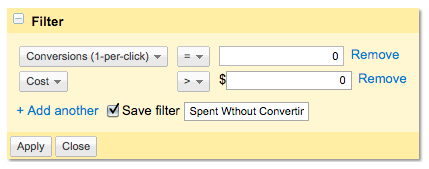
PPC Keyword Filter

I don’t know about you, but I sure don’t like to spend money without getting anything in return. This filter to identifies keywords that have been getting clicks and spending budget without converting. I normally run this filter once a week and pause any keywords that have spent 20% over goal without bring in any conversions for the month. If you have a certain spending threshold you can enter it into the cost box so you only see keywords that have spent above this point.

High Cost Per Conversion Keywords
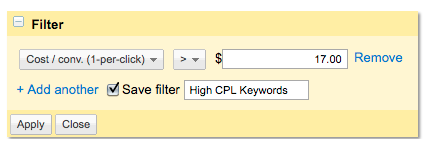
High Cost Per Conversion Keywords

It’s not only a problem to spend money that isn’t bring in any return, but you also don’t want to spend more on a keyword than a conversion is worth. If you have a goal cost per conversion you are working towards, this filter will display all the keywords that have converted above goal.

I’ve also created another high cost per conversion filter that only shows eligible high cost per conversion keywords:
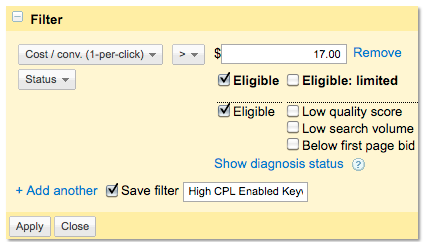
High Cost Per Conversion PPC Keyword Filter

This will show all high cost per conversion keywords that are still active in the account. This way the results won’t be cluttered with high cost per conversion keywords that have already been paused.

Low Cost Per Lead Keywords
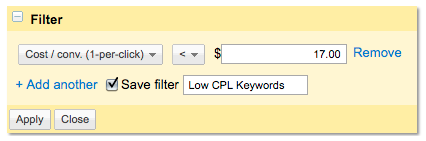
Low Cost Per Conversion Keyword Filter

This filter shows keywords that are converting below goal. I use this filter at the beginning of the month to make sure all of my low CPL keywords are turned on. It’s also a good idea to set your date range back a few months so you can use a longer date range to evaluate the keywords.

Keywords with Impressions, but No Clicks
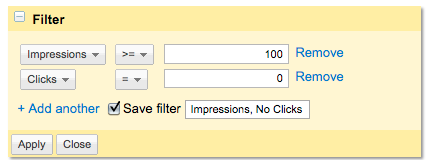
Keywords with Impressions and No Clicks

This filter identifies the keywords that have over 100 impressions with no conversions. The impression threshold you set will depend upon the amount of traffic for your account. The higher the traffic the higher you should set the threshold.

This shows me the keywords that are not resonating with users. For any keywords not receiving clicks I would check two things: search queries and ad copy. Either your ads are showing for unrelated searches or your ad copy isn’t communicating well with users.

Low Average Position, Converting Keywords
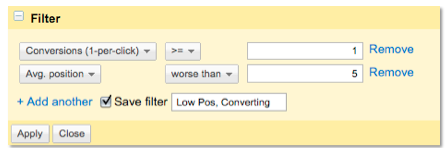
Converting Low Position KeywordsThis filter will show all keywords that have received a conversion but are showing, on average, below position 5. You can use this data to find keywords where you can increase the bid to get more visibility. If the keyword has proven to convert despite low ad positions, it’s likely that it will gain more conversions in higher ad spots.

These are my favorite keyword filters, what are some of yours?

About the Author

Bethany Bey

Bethany is a former Account Executive at Hanapin Marketing, a search engine marketing firm focused on generating results through pay-per-click advertising.
  • Pingback: My Top 5 AdWords Filters For PPC Managers | Iuvo

  • http://www.facebook.com/sonicvista Ken Foster

    Great ideas. For the last suggestion you may want to quantify it with an additional metric such as CPA. This allows you to pick different timespans using the same metric.

    • http://www.hanapinmarketing.com Bethany Bey

      Definitely agree with you Ken. I don’t want to increase a bid for a keyword in a low position if it’s converting for twice my CPA goal.

  • Anonymous

    My large entertainment client has campaigns targeting North America, Europe and London.  Campaigns either drive sales or leads, so we use a naming convention that captures the geo-target and conversion type and set filters for each.  We can quickly isolate just the lead-gen campaigns that have a different CPA target than the sales campaigns.  We can also isolate N.A. vs. EUR vs. London, etc. as they all have different CPC and CPA targets.

    • http://www.hanapinmarketing.com Bethany Bey

      Hi Barb,

      That is definitely a great tip. We have clients who target both US and abroad and clearly labeling campaigns and setting filters and it helps tremendously with account management. 

  • Pingback: PPC Roundup 8/19/11 — Taking Inventory of Your Internet Marketing Edition

  • Nataie

    I love this post, so helpful.  Thank you very much posting!

    • http://www.hanapinmarketing.com Bethany Bey

      You’re welcome Nataie, thanks for reading. If you find any other great filters to help with management please let me know!

  • http://twitter.com/Alex_Edlund Alex Edlund

    Great advice because this is a quick and simple way of saving a ton of money. I would perhaps increase the date range to one month to ensure that your data is significant and also consider seasonality changes.

    • http://www.hanapinmarketing.com Bethany Bey

      Hi Alex,

      I definitely agree with you. I’ll usually set my date ranges back a month and  then 3 or 6 months just to see any performance changes in my keywords.

  • Gustavo D’Agustini

    Great post. Thanks for sharing

    • http://www.hanapinmarketing.com Bethany Bey

      Thanks for reading Gustavo!

  • John

    Hi Bethany,

    Good post but pretty simple/beginner stuff. I assume you are, but I suggest using Adwords Editor. It is a quicker and easier way to move between campaigns and set whatever filters you need, also you can set more detailed filters. Plus it is easier to make mass changes.

    • http://www.hanapinmarketing.com Bethany Bey

      Oh yes, I love AdWords Editor. I use it any time I make bulk changes. But if I’m just doing routine maintenance I’ll usually stick to just using the interface.

    • Anonymous

      Editor is great for bulk changes, yes.  But I find the graphical display of filtered data in the live interface to be more helpful for finding actionable information.  I can use my preset filter for all “X” product campaigns and quickly view the impact of my bid rule changes (set with another tool)  over time,

  • Aisha Choudhry

    Excellent tips!

    • http://www.hanapinmarketing.com Bethany Bey

      Thanks Aisha! I hope my tips help with your PPC management.

  • wab design agency india

    this is a Excellent tips! ..thanks for sharing ………………..

    • http://www.hanapinmarketing.com Bethany Bey

      Thanks for reading!

  • Pingback: The Search vol 9: Top Online Marketing Articles for the Week | Three Deep Marketing - St. Paul, MN

  • http://www.godsboy.org Dewaldt Huysamen

    Hi thanks for these filters I just added them – saved a lot of time God bless

  • Pingback: Letter from the CEO – “Giving credit where credit is due is a very rewarding habit to form. Its rewards are inestimable.” | PPC Marketing Advice

  • Jarno

    Massive!!

  • http://www.ianfernando.com Ian Fernando

    damn straight these are def great filters to optimize the campaign. I use these all the time. 

  • http://www.facebook.com/people/Alex-Vallejo/9121921 Alex Vallejo

    Very helpful post. I wasted way too much time using Excel in the beginning just because I was comfortable with it.

  • http://www.xtremedigitals.in/ Mohit

    Very Nice.. I have been wasting lot of time using other methods to do my thing right. Thanks a ton for your help

  • http://twitter.com/LaimaMarketing Laima Ulozaite

    I would add: High QSc, low position to see if there are opportunities to bid up on these keywords.

  • Heath Showman

    Hi Bethany,

    I know its an old article so not sure if this will reach you, but I have just set up all these filters and I was amazed to find the way the data jumps out at you. I’ve found a number of issues with my campaigns that seemed to be hidden in other reporting methods. 80% of my conversions were only happening when the ad was in position 4 and above being a major find.

    Thanks for the time spent, its helped me immediately!

    • http://www.hanapinmarketing.com PPC Hero

      We’re glad that you found it useful! Thanks for reading.

  • http://twitter.com/GnosisArts Gnosis Media Group

    Bethany, this is a superstar post from a rockstar search marketer! Fantastic work! so useful, thank you!

    Eric Bryant
    Gnosis Media Group