


Hello PPC Hero followers! So, working in the PPC industry, we always have to keep in mind the different rules for AdWords vs. adCenter. My colleague Bethany Bey wrote a great article on Google vs. Bing: Targeting Features that highlights the differences in targeting methods for Google and Bing. In the past few months, Bing has been rolling out features that are making it more similar to AdWords, and more user-friendly. In Bing’s continuing efforts to make their program more intuitive, they will soon be making changes to their location and language targeting.
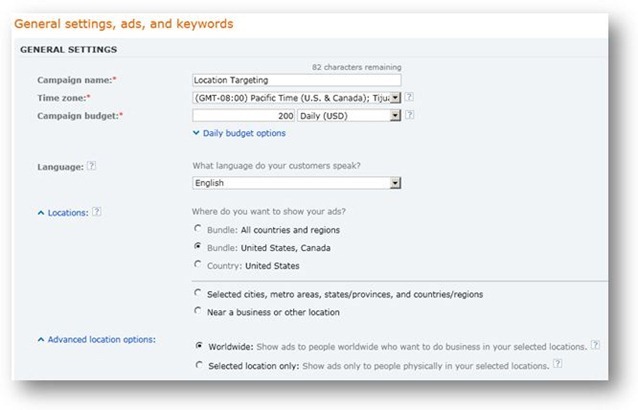
In the past, Bing had a language and “market” (distribution channel) option for its location targeting, which was to be set when the account was created and could not be changed. This level of targeting was under the ad group setting, which also made it difficult to manage. With this new update, the language targeting in Bing will look a lot more like that of AdWords. Take a look:
As you can see, it looks like Bing will be moving the language targeting option to the campaign level, it will be removing “market” setting, and we will now be able to change the language as we see fit. So, if let’s say a English speaking person in France is looking for a product that our client sells in the United States, we will now be able to target that person based on their language.
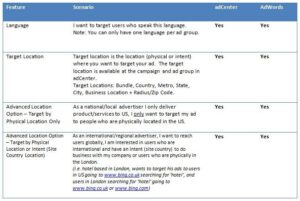
This new change will make Bing usability a lot more like that of AdWords. AdCenter posted this chart for comparison:
This change has already started rolling out and will continue to roll out in the next few months for users in the US and France. Your existing campaigns will be transferred over to these new settings automatically, so make sure to make your desired adjustments once you see the change in your account. This change will appear on the adCenter Desktop as well as the interface.
