Top 10 Reasons Why Your Ads Aren’t Showing in GooglePosted by Carrie on August 24, 2009 in Ad Texts, Google AdWords |
Your new pay-per-click account is structured, keywords loaded, ad text optimized. You activate your Adwords campaign, expecting great things, then… nothing. No spend. No impressions. No clicks. Don’t worry, it can happen to anyone. Chances are, there is one issue in your account that is preventing your ad text from appearing in the search results. Problem is, there are several possible reasons why your ads aren’t showing in Google.
The PPC Hero team frequently receives questions from readers regarding ad serving issues in Google. So, I have compiled a handy top 10 list of reasons why your ads may not be showing in Google. Start from the top and work your way down. By the end, you should (hopefully) see activity in your AdWords account.
-
Campaign/Ad Group Paused. A fundamental element for any campaign, Active vs. Paused. It may seem intuitive, but just make sure your account, campaign, and ad group settings are set to the Active setting.
-
Billing Information Issue. Review your account billing information to confirm it is correct (credit card number, expiration, address, etc.). If Google has any issue with billing, it will not serve your ads.
-
Daily Budget Not Set. Check your campaign daily budgets to make sure it is set above $0. Your ads will not run if you have no dedicated daily budgets within each campaign.
-
Keyword Bids Exceed Daily Budget. Your keyword bids may be too high for your daily budget. For example, if your keyword max cost-per-click is $4.00 and your campaign daily budget is only $10, then Google will not show your ads. If this is the case, just lower bids and/or increase your daily budget.
-
Low Search Volume. If you are not getting any impressions on your ads, it could be due to low search volume for your targeted keywords. Google will note low volume keywords within the “Keywords” tab in the interface. If your find that your keywords have a low search volume, use the Google Adwords Keyword Tool to find related keywords with higher search volume.
-
Disapproved Ads. If your ad text does not adhere to Google’s ad text policy, then your ads will be disapproved. When you sign up for email alerts, Google will send you an email if any ad text is disapproved. If you disabled email account alerts, then you can manually check your ad approvals in the interface. To find if your ads have been disapproved, login to your Adwords account and click on the Campaign Management tab. Then click on Disapproved Ads under the Analyze Your Ad Performance section. This useful Disapproved Ads Tool will tell you the when, what, where, and why’s for disapproved ad text. It will also provide suggestions for improving your ad text.
-
Disapproved Keywords. AdWords also reviews and approves your campaign keywords. If the keywords fall under AdWords prohibited content. Google AdWords does not permit advertising products and websites related to firearms, drugs, cigarettes, pornography, hard alcohol, fireworks, and more.
-
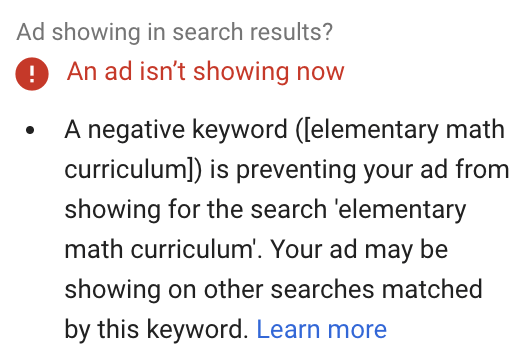
Negative Keywords. Adding negative keywords to your campaigns is a good idea, but you have to be careful, especially when using broad match. Review your negative keyword list. Make sure that you have not added negative keywords at the campaign or ad group level that nullify your keywords within any given ad group.
-
Position Preference Is Preventing Ad Serving. In theory, position preference is a great tool when you want to control where your ads appear in Sponsored Search rankings. But if your keyword bids are not set correctly, the position preference tool can stop serving your ads. According to our Google rep:
“Position preference instructs the AdWords system to try showing your ad whenever it’s ranked in your preferred position and avoid showing it when it is not. It does not mean that your ad will appear in the position you specify for every single search on your keyword. If you broaden your position preference, you’ll see that the keyword will trigger the ad.”
So, if your bids are too high or too low for the selected position, your ads will not be served. The Google position preference tool will only show your ad when you qualify for the designated position. To fix this, either turn position preference off, or expand your preference to include more positions.
-
Patience. If all else fails, sometimes it is best to wait. Google ad text and keyword approvals can take up to five days. When you submit your ad text and keywords, you are entered into the Google review and approvals queue. If it has been more than five days, contact a Google rep to see if your keywords and ads have been approved. Here is a related post about reasons why your ads aren’t showing in Google.
If you have worked through this entire list and still don’t see results, then it is time to contact your Google rep. Your account may have bigger problems than bids, budgets and ad text approvals.
Have you encountered any other issues with ad serving in Google? Please leave a comment and share them with us!
- PPC Hero Answers: My Ads Aren’t Showing?
- Our Greatest Hits for August 2009
- PPC Hero Answers
- Yet Another Reason Why Your Ads Aren’t Showing in Google
- Are Your Keywords Not Showing Due to “Low Search Volume”?


August 25th, 2009 at 1:08 am
How timely! Am onto Google because one of my accounts has zero impressions for this month. There’re no error messages, have checked absolutely everything 3 times over and can’t find WHY. It’s not a new account, being going since last November……..any clues why it would stop without warning?
August 25th, 2009 at 1:42 am
Like Carrie Says: if one of your account’s not have any errors and your Ad’s or Keywords show zero impressions, its passibly Low Search Volume or No
Due to a limited number of ad positions on a given page (up to eleven ads may appear per page), your ad could not be displayed within the first page of search results. Keyword quality score. it can be that one. You can check your Quality score when you move arrow into Keyword and it should show Quality Score or
===>
Displaying·ads right now?
No
???????????
Best way to check that. its to copy existing Ad Group in to Different Campaign.
maybe that’s the issue.
post me screens if you wont i can check it for you and maybe we can fix that issue.
on
tommy@proppc.co.uk
Thanks.
August 25th, 2009 at 3:13 am
Nice list Carrie. One other thing I would look out for is ad scheduling, which could prevent your ads from showing on certain days / times of the day. Although to be fair it’s pretty unlikely you’d accidentally set up ad scheduling then forget about it…
August 25th, 2009 at 3:46 am
Agree
August 25th, 2009 at 6:57 am
Great post Carrie – some very useful advice.
I have another to look out for as well – the type of delivery method being used to serve the ads. If set to Standard instead of Accelerated, then there’s every chance that the adverts will show intermittently throughout the course of the day.
August 26th, 2009 at 7:21 am
@bonzaros occasionally google will review accounts and that can stop your ads from running for a time. there is no notice or warning when they’re reviewing. if the ads don’t come back in a day or two i would live chat a google rep.
nice list – don’t forget the ‘ad disapproval tool’ if all else fails. many times it’s all budget related, by upping the daily budget by a few bucks the ads turn back on and run. (even if google says daily budget is ok).
August 26th, 2009 at 8:57 am
I’m new to Google Adwords. My issue is with the fact that when I first started the campaign, everything was great but then the keywords jumped in price.
Keywords were only .05 cents at first. I was getting hits and was excited about it. Then every consecutive day the price has increased. Now they are up to 1.00-2.00 dollars per click. That’s ridiculous to me especially when I do the Google search for that word and only one competitor shows up for that keyword.
All this time I had thought that the price was based on competition, now I realize it has to do mostly with relevance. But My keywords are relevant to my site! Why should I be forced to pay $1 per click when I see little competition & I’m using relevant keywords? This system doesn’t seem to support small niche market business in my opinion.
Lets say 1,000 people click on the adword, 10% may really be looking for what we offer. One or two of them might really bite. That’s 1/3 of the profit going to google.
I would love some advice on this. Thanks.
Josh
August 27th, 2009 at 9:12 am
@Josh
If your keywords are consistently increasing in price, then you may have a quality score issue. Make sure that your campaigns and ad groups are very structured, with all ad groups within a campaign similar to each other. If you have an ad group that has more than 25 keywords, think about breaking that down into two ad groups. Also, make sure your keywords are used in both your ads and landing page. This will help your quality score.
Another factor that could hurt yoru CPC is CTR. The lower the CTR for your keywords, the lower your Quality Score, and the higher your CPC will be. Try testing some different benefit language to increase your CTR.
August 27th, 2009 at 9:18 am
@Alan You make a good point about ad scheduling. If you inadvertently step day parting, then you will not see your ads appear during that time. I’ll have to add #11 to this list!
@elise Great comments. We have also found the “Disapproved Ads Tool” to be quite helpful.
@Peter Gould You are right on ad serving. It is possible that if you have your ads set to accelerated, then at the end of the day when your budget is spent, then your ads won’t show. Conversely, if your ads are set to Standard, then you will not see your ads for every search query because Google is spacing delivery based on anticipated daily search volume/spend.
@Bonzaros Are you still having issues with your ad serving?
August 27th, 2009 at 3:11 pm
Problem solved everyone – and it’s NOT pretty.
The campaign was suspended by Google because there was unathorised access to the account. Wonder why Google didn’t bother to tell me! I’ve been struggling for a whole month to resolve it…….
How did this happen? It’s a long story and I’m going to tell it because it may serve as a warning to others.
I OUTSOURCED to a GAP in India. He had the credentials, I double checked and the work he did in my accounts was good. Then out of the blue he cancelled our agreement. I changed all the passwords and removed his access to my accounts.
A couple of days later, 2 accounts were suspended and it’s taken 3 months to get them back on track. Google actually gave me some credit to compensate client’s loss of income. No financial loss on their cc. Whew!
I had my computer turned inside out to remove any malware.
Google assured me no other campaigns in my master account were affected.
So here we are 3 months later dealing with yet another account infected by some bastard. This is the acount I’ve been talking about here.
So, thanks to everyone who tried to help get to the bottom of my problem.
I appreciate it and it’s great to be amongst good people.
April to August has been a complete disaster.
Does anyone else outsource their PPC?
Ros
August 30th, 2009 at 9:48 am
Thanks for your great suggestion. It helped me. You have said the all above points are the major cause. If any body avoid the above of the one then the problem must arise…
Your blog also helped me for gathering ideas about pay per click because i am a newbie, researching on pay per click management.
Thank you again….
August 31st, 2009 at 7:43 pm
I have tried to figure it out but can’t understand why my ad does not ever appear.
I did a keyword diagnosis and it said
the keyword phrase dosen’t currently trigger any of your ads
upon further investigation it said
check keyword status
I checked and all keywords were eligible.
it also said
you may want to raise daily budget
but a view recommended budget search says my budget is ok and recommended no changes.
networks devices & extensions set to
all available sites
position preferences is OFF
show ads in any position
my ad is approved
billing is set up
campaign is enabled
regions to show ad are set up
I am running out of guesses, have spent many hours trying to figure out why my ad does not appear for whatever keyword I may try. can you please help ?
September 1st, 2009 at 7:18 am
@ Steve – Try upping your budget even though Google says it’s ok. I’ve experienced the same issue and as soon as I raised the daily budget a few dollars the ads started running. Hope that helps – Good luck!
September 1st, 2009 at 12:54 pm
Allright, Just out of curiosity what might a decent budget be according to google ? Right now I’m at a cpc bid of $1.75 and a daily budget of $5.25. I wasn’t wanting to spend much more than $150.00 a month Max. I am going to up it a couple bucks but I am wondering what your advice might on what a decent budget is ?
September 1st, 2009 at 1:07 pm
Just by upping your daily budget by $2 let my ads run consistently. If your monthly budget is at $150 than I would increase it slightly to $180/$200, this will give you a daily budget around $6.50.
If you’re bidding up to $1.75 per click that means you can only have 3-4 clicks before your daily budget of $5 is exhausted. This will cause Google to limit your impressions and show your ads less frequently. Upping the daily budget gives it a chance to show more throughout the day.
Remember, just because your budget is set to a certain amount doesn’t mean that it will be spent. Just be sure to monitor the account so you don’t go over your target spend.
September 1st, 2009 at 1:09 pm
@elise Well said, I agree with your comments.
@Steve I would agree that your budget is set a little to low. A monthly budget of $150 is fine if your average CPC was below $.50. But at $1.75 cost per click, a $150 budget is a stretched a little thin to see impact for a pay-per-click campaign. Yoru only going to see 3 clicks a day. Try increasing your daily budget (perhaps to $15-$20) and see where that gets you, that will give Google more to work with a higher CPC. As @elsie said, that doesn’t mean your budget will be spent. At the very least, you can pause your campaign towards the end of the month if you are over budget.
Do you have our ad serving set to Accelerated or Standard?
September 1st, 2009 at 2:37 pm
Ok I increased my budget to $15.00 a day and decreased my cpc bid to $1.00 a day,.. how does that sound ? is an average cpc usually below a dollar or over a dollar ?
My ad serving is set to standard.
September 4th, 2009 at 8:57 am
Don’t recommend outsourcing anything to India, especially pay per click. I have been in the game awhile and India is pretty much unreliable and with a down global economy many individuals there are setting up SEO/PPC mgmt firms because there is an industry for them. However, it does not mean they can help you take your PPC account to the next level or that they truly can understand your product and can raise your quality scores.
September 4th, 2009 at 11:32 am
another reason you ad might not be serving is people hijacking your ads by using your display URL and outbidding you. This is a common practice with affiliates.