


Last week Google made a couple of very important changes to their current remarketing set up. The first was enabling you to manage your remarketing lists within Analytics, which will mean you can start to develop really honed ads and offers to entice your users back. The other, is that you can now place a remarketing code for your entire site, rather than placing specific codes on specific pages. This is great news because it not only makes the act of placing codes easier – no huge emails with multiple codes that need to be implemented being sent to clients or to your in house tech team – but it also means you don’t need to keep adding more codes over time when you change landing pages or want to remarket new products.
So how does this new remarketing methodology work?
First you need to create a code which you will use on every page on your site. This may already have been created for you by Google. To see if you already have a ‘Main List’ from Google, go into your audiences tab within AdWords – found in the shared library on the left hand side.
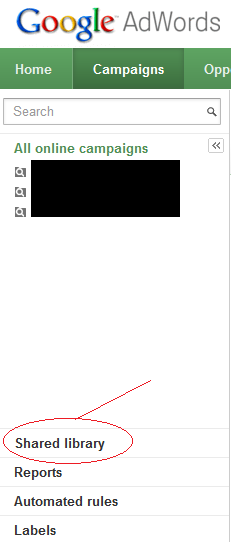
If you can see the ‘Main list’ in here as shown in the screenshot below, skip the next section.
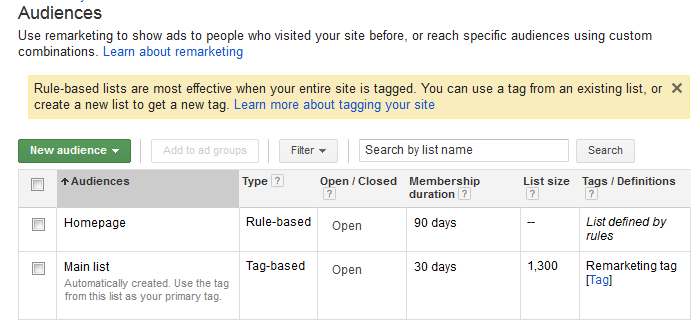
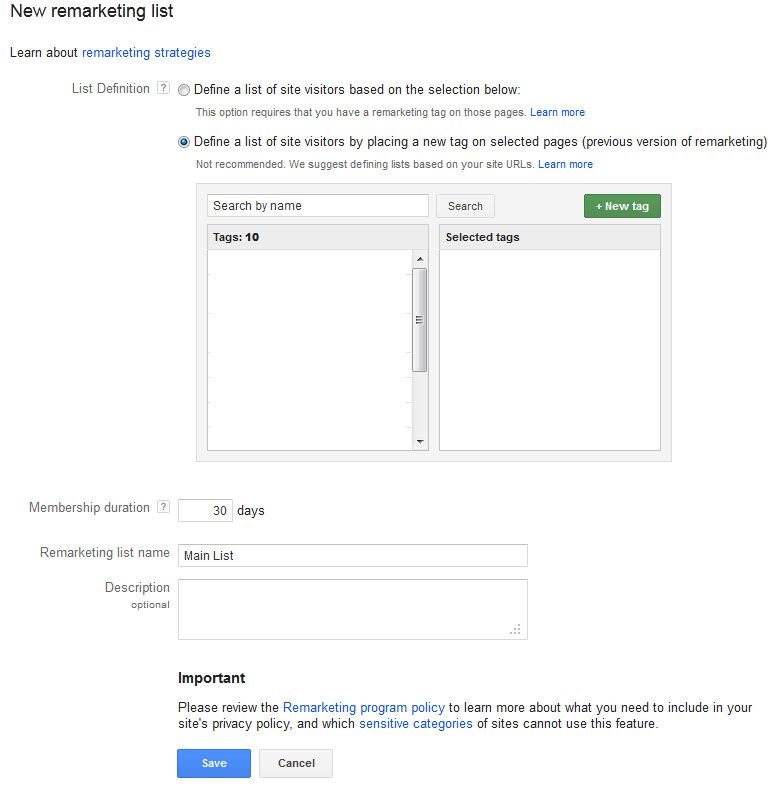
If you don’t have a ‘Main List’ click ‘New audience’. Select ‘Remarketing list’ and from there select ‘define a list of site visitors by placing a new tag on selected pages’. Select the green ‘+New tag’ button, and then fill out your remarketing list name as ‘Main List’. I’d recommend setting your duration for 365 days on your main list, as you will be able to be more specific with your new rule based lists at a later date.
Now we should all have a Main list in our audiences! This tag needs to be applied to your entire site to pick up as many users as possible. Your tag should be viewable in the tags/definitions column of your audiences table. Click the blue [Tag] button from your Main list row to open this up.
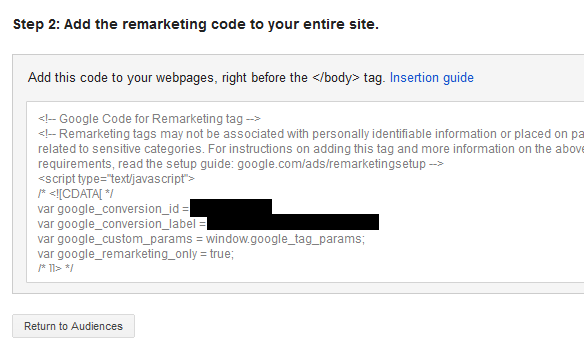
If you use a content management system (CMS) pasting this code across your site should be pretty straightforward to do – simply paste the code into the footer above the </body> tag. If you have a webmaster, email them the tag and tell them that it needs to go between the body tags across the site.
For those of you already using the old remarketing codes, Google has written a great explanation of how to transition from old to new. Essentially: add the new code to your entire site and remove your old codes, but don’t delete your remarketing lists from AdWords – that way you can remarket to your old lists while your new list builds.
Ok! Now we have the new run-of-site remarketing code set up, we can start making rule-based lists! Go back to your audiences tab and select ‘New audience’ > ‘Remarketing List’. Now select ‘Define a list of site visitors based on the selection below’. Here’s where you can start to get clever. You have your remarketing code set up for every page on your site, so you can start manually creating lists using any combination of pages on your site you like.
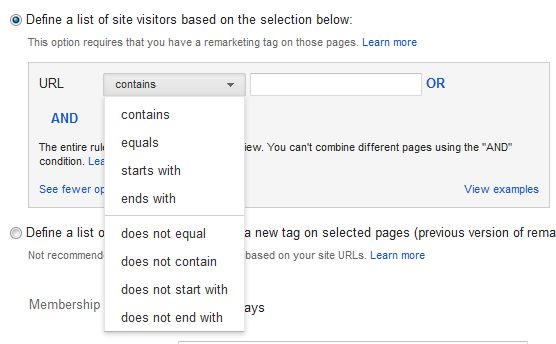
Reasons we like this at PPC Hero:
- A lot of accounts using the old system only tagged a few pages – now you can generate a much larger number of users to remarket to. I just did a very quick back of an envelope calculation for one existing account and about 35% of all users are being captured for remarketing – that’s an extra 65% I should have access to!
- You can quickly set up different lists for different stages of cart abandonment. Set these lists up using the URL contains option and creating a new list for each URL stage of your cart – you can get clever by marketing free shipping to people who bail on the shipping costs page for example.
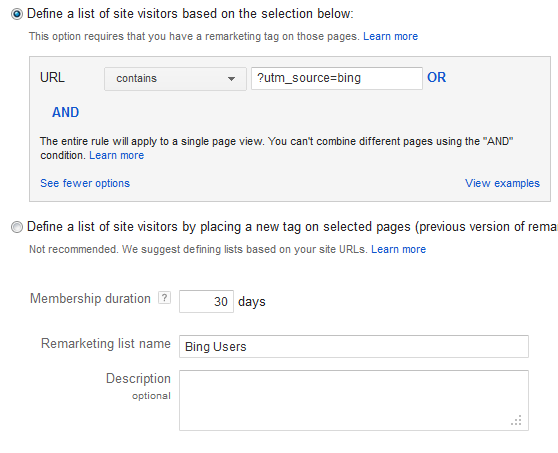
- If you set up custom tags on your URL links you can remarket to users from different sources very easily. Using the Google URL Builder you can set your source – so your email links might be built using source = email, and your URLs from Bing might contain source=Bing
Here’s an example custom URL for a PPC hero Bing campaign:
https://www.www.ppchero.com/?utm_source=bing&utm_medium=cpc&utm_campaign=adcenter
And here’s an example of how a remarketing list for bing users might look:
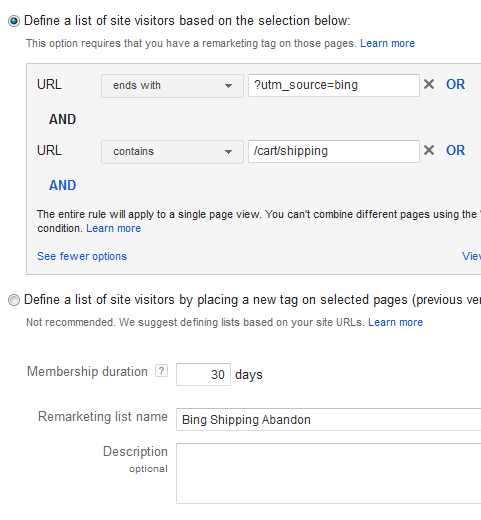
- You can get even more granular by creating an AND combination to market to users from Bing who bailed at the shipping stage of your cart.
While a lot of these things could be done before, they are now much, much easier to do, which makes creating much more specific and targeted lists much more likely to be worth the extra effort.
Note: You may need to make changes to your site’s privacy policy to use remarketing. Here’s also a list of sites and products that cannot use remarketing.
As always, let us know if you have any particular new rule-based remarketing combinations you think would be cool for us to hear about in the comments section below.
