



Change is something we’ve come to expect in the paid search industry. It’s almost as if new enhancements and features are introduced on a weekly basis, and they have been. This month alone, Google AdWords rolled out dynamic search ads, +1 button for display ads and their new bid-per-call system. On the other hand, the Yahoo! Search and Bing also recently introduced a handful of new features as well, including improved monthly budget calculation. Hopefully this doesn’t come as news to you, as many PPC managers tend to be diligent blog readers to stay up to date with the latest industry happenings!
Today, I have some even more exciting news to share with you. On behalf of the Yahoo! Search and Bing, I’m pleased to announce that the new adCenter User Interface (UI) is now available to advertisers worldwide! After having the opportunity to test-drive this baby through one of our client accounts here at Hanapin Marketing, they’ve included many greatly anticipated additions this round that will truly help adCenter advertisers streamline their account management process moving forward. That being said, let’s go into more detail about these exciting new additions:
Access All Entities From A Single View
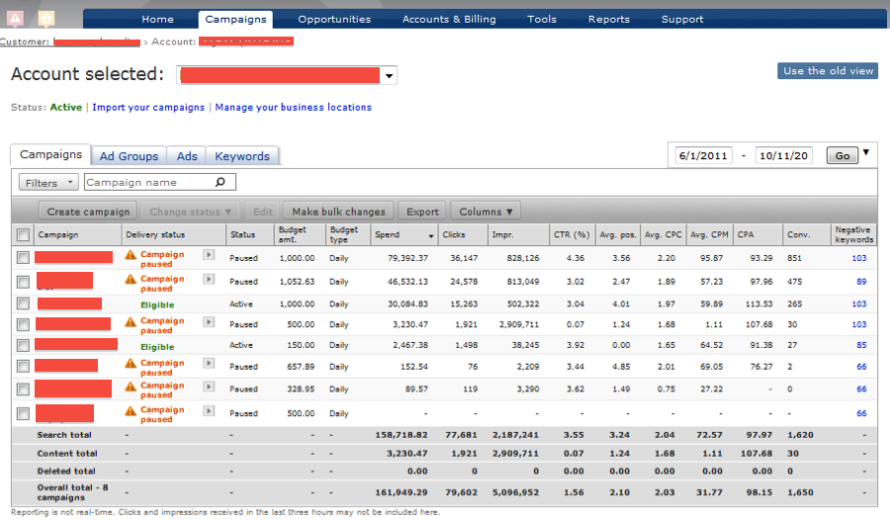
This feature is, by far, my favorite change from this round of improvements, and I’m confident that you’ll agree! You can now view all entities from the Account and Campaign Summary pages via sub-tabs. What this means for us is that you no longer need to drill into each campaign to find keywords and ad groups. Instead, all of your ad groups, ads and/or keywords can now be accessed with a single click on their respective tabs. This is something we’ve had access to in Google AdWords for a while, but is now available in Microsoft adCenter as well.
Ad Delivery Status Indicator
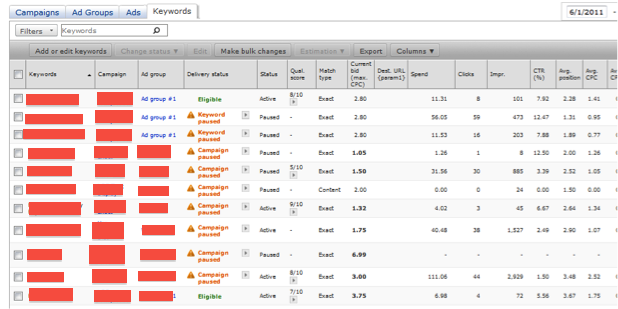
Microsoft adCenter now provides a new ad delivery status column, which is the second of their recent additions to the new UI. Essentially, this new column helps advertisers identify ad delivery issues within a particular list of keywords, which indicates pre and post-auction delivery status. This can be a helpful resource for diagnosing individual keywords that are causing ad delivery issues within your accounts.
Advanced Filters
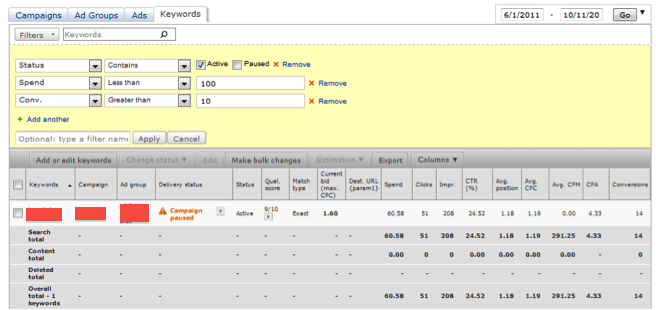
Another feature adCenter included with their new UI allows you to create, save, and apply advanced filtering to the data summary grids. As we’ve already seen in Google AdWords, these filters are a quick and easy way to streamline your daily PPC management and access custom account views instantly. As of now, you can save up to 5 custom filters for each sub-tab.
Inline Editing
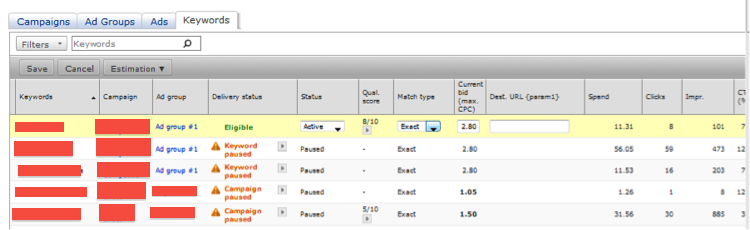
This feature provides you the ability to perform inline editing from the campaign, ad group, ad, and keyword list tabs. In other words, this significantly reduces the number of clicks required for updating campaigns and further streamlining your daily PPC account management.
Enhanced Bulk Editing
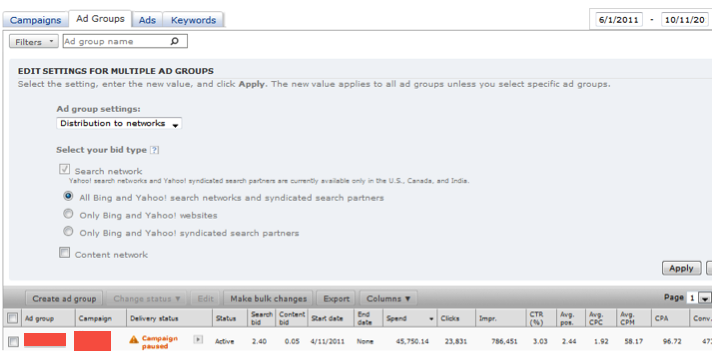
Next up in Microsoft adCenter’s new line of features is the enhanced bulk editing capability now available within the campaign, ad group, and keyword list tabs. This becomes yet another way in which it is now faster and easier to make multiple changes from a single view, rather than having to drill down individually to make a change.
Simplified Campaign Creation/Editing
This launch will also include a simplified process for creating new campaigns and ad groups. Once again, this is yet another way in which we can now streamline our account creation process with fewer clicks on our end.
Adding keywords
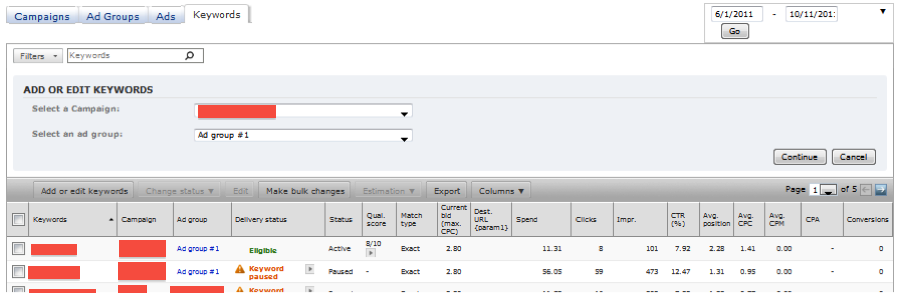
Coupled with the new campaign creation workflow, the adCenter engineers have also simplified their keyword addition and bid selection processes. With the new UI, we can now use the drop-down menus to determine which campaign and ad group you want to add your keywords to. Essentially, this allows us to cut back on wasted time having to drill down into specific ad groups in order to enter keywords into it.
Visualization Of Account Performance/Trends

Lastly, a new multi-metric trend graph has also been added to the Campaigns tab that displays trends of multiple metrics at the same time. Unfortunately, this wasn’t available during my adCenter UI test-drive, but this feature enables a visual comparison of what’s going on in our accounts and the ability to make changes on the fly. This is another feature we’ve had access to in AdWords that is now offered in adCenter as well.
As you can see, we now have access to a number of awesome new features in the adCenter UI that can help us streamline many of our account management/creation processes on a day-to-day basis. So what are your thoughts on these changes? Which are your favorites? Are there any other features you would have liked to see included? Feel free to drop any comments, questions or concerns you have below!
All of us here at Hanapin Marketing would like to thank Michelle Campbell and the rest of the Yahoo! Search and Bing teams for giving us the opportunity to explore the new interface and provide such coverage of the release!
