
PPC Hero
Welcome to PPC Hero, the authority on pay-per-click strategy, industry news and great ppc-insider tips. Here you'll find our Reader's Favorite posts, PPC management handbooks, Team's Favorite posts, our Most Commented posts, and our collection of blog series. Don't forget you can receive email updates to keep you informed of the latest PPC Hero articles.
Print This Post Print This Post

How Can You Save Time and Money When Managing PPC? Use Ad Scheduling in AdWords!

Posted by Joe on March 20, 2009 in Advanced PPC Strategies, Tools

ppcsavetime3

Ad Scheduling within Google AdWords allows PPC managers to control the days and times their ads appear. As the final installment of our time saving blog series, today we will discuss how you can save time and money by utilizing this helpful AdWords tool.

Utilizing your AdWords reports and your Analytics program, you may be able to determine when your ads perform best on Google. And there could be times of the day or entire days of the week that don’t generate positive results for your campaign. You want to accentuate the positive (when your ads work best), and de-emphasize the negative (when they perform at their worst).

For example, lets say you discover that your conversion rate is extremely low in the evenings and over the course of the night. It may make sense to automatically decrease bids or completely shut your ads off during these times.

There a couple ways to save money with Ad Scheduling. You can completely turn your ads off. You can also automatically decrease your bids at certain times of the day. If you want to decrease your bids by 50% from 8pm-4am, you can initiate that setting and AdWords will adjust these bids automatically for you.

This is how Ad Scheduling can save you money, by decreasing your cost-per-acquisition and better-targeting your ads. But how does this save you time? Making these large-scale bid and campaign adjustments manually would swallow a great deal of your time. With Ad Scheduling, you determine when you want your ads to run and what you wants your bids to be, and this tool can make the adjustments for you.

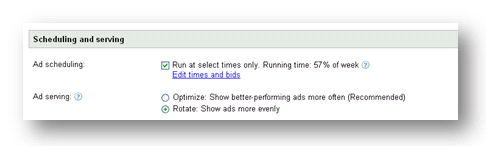
Now, we’ll go through the basics on setting up Ad Scheduling for a campaign. You will find the “Ad Scheduling” option within your AdWords campaign settings. Within the given campaign, click “Edit Campaign Settings” and here you will find the “Scheduling and Serving” information. To automatically change your bids or adjust when your ads will appear, just click on “Edit times and bids.” This is what you should look for in your campaign setting screen:
You can choose days of the week and the hours throughout the day that you would like to display ads. As you can see below, I will be run my ads from 5am to 8pm, Monday through Friday. Also, my ads are not active on the weekends. You can see how I have set this up below:
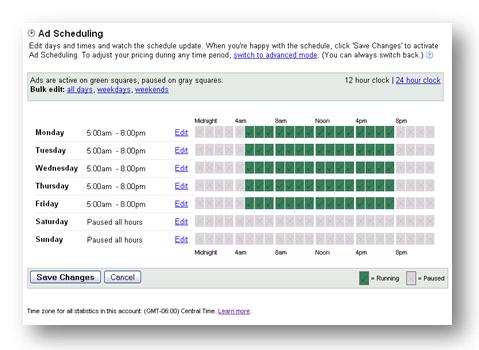
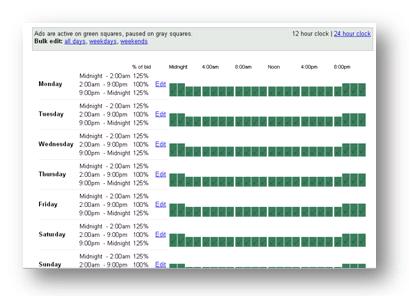
Setting up Ad Scheduling is just that easy! These steps are for when you want to turn your ads on and off. Here is a screen shot for when you want to automatically adjust your bids:
shot2

To get to this screen, you can click on “Switch to Advanced Mode.” As you can see, I am increasing my bids by 25% from 9pm to 2am.

One caveat, we recently wrote an article on how time zones effect your Ad Scheduling settings. Before making any changes to your settings be sure to read that article.

However, please make sure that you are have the proper data when making these decisions. Aggressively decreasing or increasing bids, or completely pausing your ads, on certain days or times of the day, is a major strategic move. So, just be sure that you have a large enough data sample to statistically validates these choices.

You can see that Ad Scheduling is a powerful tool within AdWords. As they in Spiderman, with great power comes great responsiblity. So, just be sure that you have the appropriate performance sample size to validate making these kinds of changes to your campaigns. Ad Scheduling can be a great way to save time and money when managing your AdWords campaign.


Subscribe to RSS   Get future posts sent to you free and automatically via email or RSS Feed !

Related Posts:

10 Responses to “How Can You Save Time and Money When Managing PPC? Use Ad Scheduling in AdWords!”

  1. Tom Demers Says:

    Great post; I actually have a sort of looming…hesitation? Superstition maybe? surrounding day parting; maybe you and/or a reader can allay my fears: how does the Google report spit out conversion data? Is it based on time of visit or time of conversion? The concern(s) being that the traffic is driven in the AM and the purchase gets made in the PM, etc.

    Anyway great post!

  2. How Can You Save Time and Money When Managing PPC? Use Ad Scheduling in AdWords! : Virtual Real Estate Blog Says:

    [...] Source:How Can You Save Time and Money When Managing PPC? Use Ad Scheduling in AdWords! [...]

  3. Hiren Desai Says:

    Hello Tom,

    Regrading to your question, I would like to inform you that Google segregates time of visit under visitors sections and time of conversion under goals or ecommerce…. To justify this statement, you can observe your adwords account wherein many a times you will have ZERO visitor or clicks and ONE conversion … this happens while change of time from AM to PM …or other way… Please correct me if i am wrong anywhere … this is what i have observed and believe… I would highly appreciate more comments on this :)

    Tom, Hop your query is been answered.

  4. web copywriter Says:

    @Tom: you are right, I agree with you: very often the buying cycle starts at a specific time and/or day, and then is closed in another time and/or day. So, be careful with day parting!

  5. Joe Says:

    @ Everyone: Greetings. This is a good question about when a conversion is attributed to an AdWords accounts. Is it based on the time of the click or the time of the conversion? For a quick reference, I ran a performance report for a click that runs ads Mon-Fri and they are paused on Sat-Sun. My account performance report does not show any conversions on the weekends (at all). This means that either I never generate conversions on the weekend (from users bookmarking the site and returning later) or if I do convert on the weekend, that conversion is attributed to the week days when my ads are active. I will put this question to my AdWords and see what I get! Keep ya posted.

  6. Tom Demers Says:

    @joe @hiren @web copywriter: thanks for the feedback, very helpful!

  7. web copywriter Says:

    @Joe: according to my Google Account the sale is rightly attributed to the click event and not to the sale.

  8. Vertical Return Says:

    Companies on the East Coast often find that their conversion rates fall after the close of business because nobody is available for live chat or phone calls. Our clients who track their offline conversions often find that almost none of their after-hours callers leave messages. If you’re up to 3 hours ahead of the rest of the country, I think it’s worth considering opening a West Coast call center to pick up on those lost callers.

  9. Joe Says:

    @ Vertical Return: Excellent point!

  10. WebpageLottery Says:

    I just found out that you can schedule your ads after using adwords for years. This is useful to me because most of my daily budget spend on early in the mourning where asia is night time.

Leave a Comment

Hanapin MarketingeMarketingSilo Keyword Tracking Tool iSpionageClick Equations AdWord Accelerator acquisio SEMRush PPC Dynamite

 
Advanced Search
PPC Hero Handbooks
PPC Hero Blog Series Blog Cateogry


Google Ad Words Qualified Company

Yahoo Search Marketing Ambassadors

Microsoft adExcellence Member

BIGLIST of Search Marketing Blogs


2010 SEMMY Finalist
2009 SEMMY Nominee
2008 SEMMY Nominee


PPC Hero & SEO Boy


Copyright © 2007-2010 Hanapin Marketing, LLC
Best Posts Contact Us About PPC Hero Advertisers Consulting Email Updates Become A Fan Follow Us RSS Feed PPC Hero