


The fuel that drives every PPC campaign is your keyword list. The success of your campaign will live and die by the keywords that you target. You need to make sure that you are targeting the right keywords and that your keyword list is extensive and robust. And your list of keywords needs to be ever-evolving as new and longer search terms become prevalent among your target audience. That’s a lot of pressure for a keyword list to live up to! Today, I’ll discuss two new tools that Google has released that will help you expand your keyword list and find the niches you may be missing.
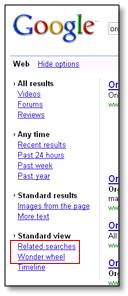
Where do you find these tools? Just conduct a search in Google. Within the SERP, you will see a link that reads, “Show options.” Once you click on that link, you’ll see a series options to alter your search results including video, forums, etc. What we are looking for is at the bottom of this list, as you can see in this screen capture (circled in red), Related searches and Wonder wheel:
Google Wonder Wheel
First, we’ll discuss Google Wonder Wheel. Honestly, I think this is a very helpful and insightful tool for PPC keyword research. I will walk you through a series of searches for the keyword “organic gardening.” Let’s just say that I sell a line of organic gardening supplies and tools on my site. I want to find new keywords that I am currently missing with my PPC campaign.
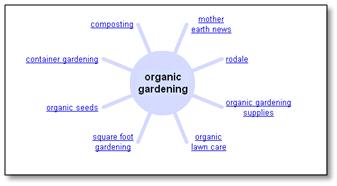
The search below has “organic gardening” in the center and there is a series of related terms included within the results. Sure, some of these may be more relevant than others but I am on the right path to finding new keyword niches with this tool. Within these results I am going to click on “organic gardening supplies” since this is what I offer on my site.
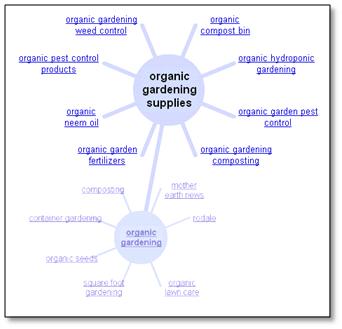
Now, as you can see below “organic gardening supplies” is in the center of the wheel. There are a series of related terms encircling our core term. And also, this tools displays the previous wheel from which we came below (very handy!).
For this example, I will say that I am lacking in fertilizer keywords. As you can see, this is a topic included in my keyword topic wheel. To dig deeper into this keyword niche, I am going to click and explore “organic garden fertilizers” to see what new terms I can discover.
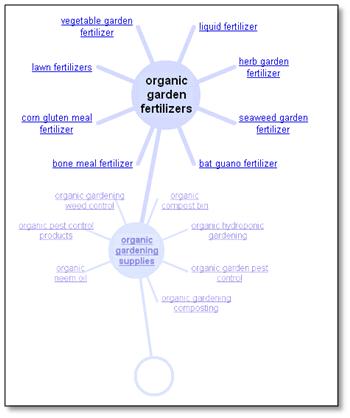
Below, you can see now that “organic garden fertilizers” is in the center of my wheel and it is surrounded with an additional list of relevant terms. And this kind of digging can go on and on (almost forever!). There could be an entire keyword set, such as “bone meal fertilizer” or “herb garden garden fertilizer” that I am missing. But now I can add these terms to my keyword list for greater visibility and targeted search volume.
Google Related Search
The other tool that can be extremely helpful when conducting keyword research, looking for those new niches you may be missing, is the Google Related Search option. This tool works similarly to the Wonder Wheel but it has no graphical element. However, it contains more results and the results are slightly more detailed.
For this example, I am going to continue with my organic gardening theme. As you can see, the core idea between the two tools is similar: you have the ability to explore keyword unique keyword queries/niches in order to find new relevant terms for your PPC campaign.
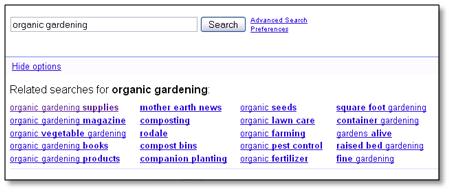
As where Wonder Wheel provided eight options to explore for “organic gardening,” Related Search provides twenty different terms that I can explore. So, you are given more options here. Let’s go ahead and explore “organic gardening supplies” to see what results we receive.
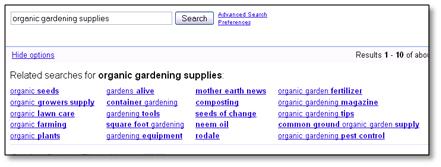
Within the screen shot below, I am now focusing on “organic gardening supplies.” Again, the tool provided 20 different related keywords that I can dig into at a deeper level. From the Wonder Wheel I realized that I am lacking in my “fertilizer” keyword groups so I will continue my research in this direction by clicking on “organic garden fertilizer.”
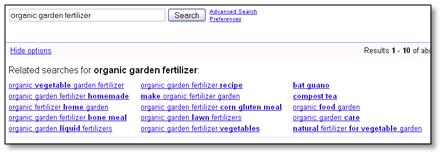
As I said previously, the Wonder Wheel provided eight different search terms and Related Search tool provided twenty (I didn’t include them all because they wouldn’t fit in the screen shot!). And here you can see all of the variations for “organic garden fertilizer” that I are waiting to be explored!
As I dig deeper into each niche I pick up keywords and add them to my list. This way, for each level of specificity, I am find keywords that get more granular. As you explore these terms and add them to your keyword list, you can go one step further by utilizing the keyword within Google AdWords.
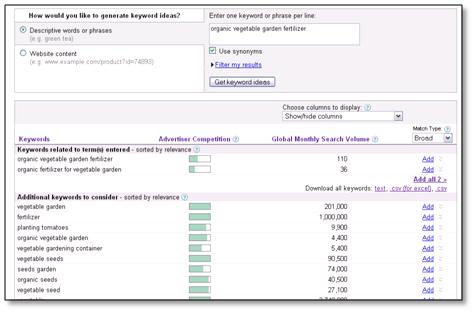
Here, you can type in the new terms you have found using the Wonder Wheel and Related Search tools in order to hunt for even more new keywords. In the example below, I conducted a search for “organic vegetable garden fertilizer” and I found even more possible terms to add to my keyword list.
With these three tools as your command, you will be able to expand your keyword list aggressively. And the best part is that these terms should be highly relevant for your existing keyword list! Happy hunting!
