


Way back in January MSN announced a new adCenter add-in tool for Excel 2007 call Ad Intelligence. Recently, MSN adCenter announced that they are releasing this add-in for Microsoft Excel 2003. With this release more people are going to be able to utilize this tool so I thought I would conduct a quick review of the MSN adCenter Ad Intelligence tool for Excel.
The adCenter folks have done a good job pulling together a useful keyword tool that is quite robust. In fact, I can’t cover all of the functions in Ad Intelligence in just one post (otherwise this post would be huge!). So, I’ll break Ad Intelligence into digestible chunks and we’ll first focus on the keyword generation portion, and then we’ll discuss categorization/demographic functions at a later date.
 |
Keyword Wizard:The keyword wizard is the core tool for keyword generation. It seems like there are no perfect keyword tools out there but this one does a rather good job providing keyword ideas and alternatives. We’ll go step-by-step through this function so that you can see what Ad Intelligence has in store for you (if you’re not using it just yet).
1. Keyword origination: The first step in keyword research is to enter your core keywords and then expand from there. There are 3 options that you can choose here. However, for simplicity sakes, we’ll maintain our focus and just use the keyword tool (as opposed to the vertical search tool, or keyword extraction). The keywords I will be conducting research for include: pay per click marketing, ppc, paid search marketing, search engine marketing, pay per click advertising. This step is simple enough.
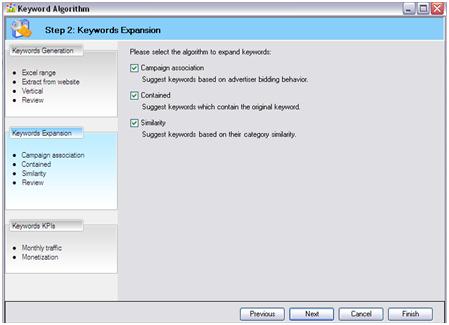
2. Keyword expansion: The second step involves 3 options to expand your list:
Campaign association: Suggest keywords based on advertiser bidding behavior.
Contained: Suggest keywords which contain the original keyword
Similarity: Suggest keywords on their category similarity.
In this example, I am going to choose all three settings since I want to see how expansive the keyword variations can be in this function.
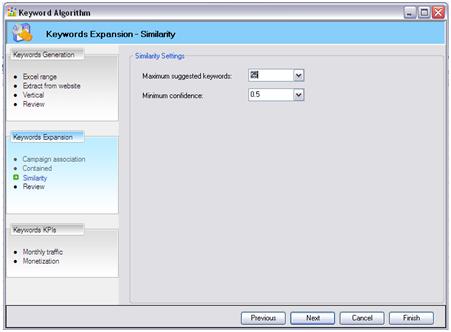
3. Similarity: In step three you will determine your campaign association settings. Your association options range from 0.0 to 1.0, and 1.0 is the highest level of relevancy to your original keywords. As you can see here, I am going to choose a relevancy of 0.5 as I want my keywords to be targeted, but I’m still open to suggestions:
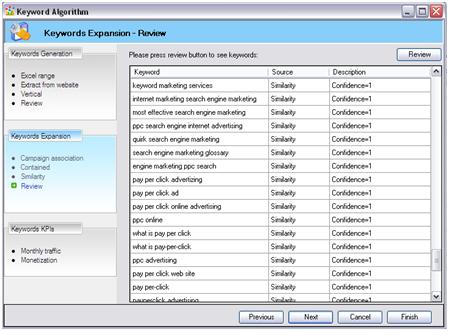
Once I’ve entered my original keyword list, and set all of my preferences then I am served a list of keywords that are ranked by relevancy. You can see that these keywords are ranked with a 1, which is the highest ranking:
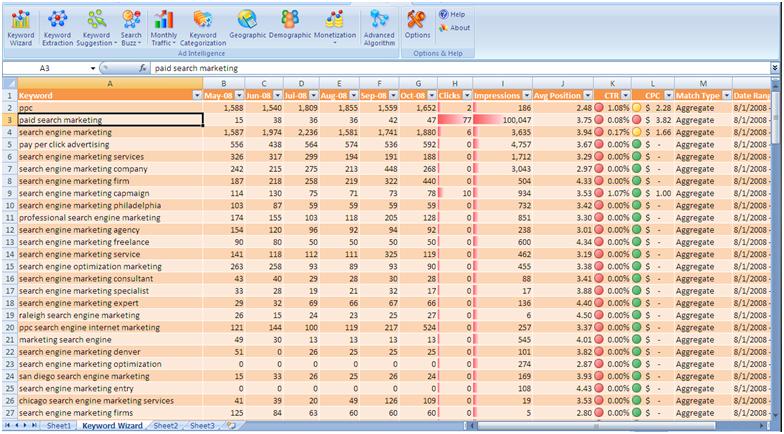
4. Traffic & monetization: The next step is where you can really get some great keyword detail. You can select to see each keyword’s monthly traffic and monetization (projected CPC, CTR, impressions, etc.). As you can see below, Ad Intelligence provides a lot of detail for each keyword. Click on the image to see the details more clearly:
I know there a number of keyword tools out there but MSN adCenter Ad Intelligence is quickly becoming my favorite because of the quality of the results; the breadth of data for each keyword; and it’s relatively easy-to-use interface within Excel (2003 & 2007).
And I haven’t even covered the 7-8 other functions that tool has to offer! Some of them work better than others, but overall, this could be a very nice piece of your keyword research puzzle.
