


One of the newly visible metrics within the updated Google AdWords interface pertains to conversion tracking. Today, we will explore the difference between the “Conversions (many-per-click)” data and the “Conversions (1-per-click)” data.
If you have migrated to the new AdWords interface, you have probably noticed these additional conversion tracking columns within your stats. Here are the columns in question:
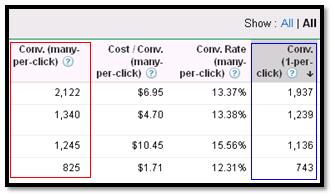
In regards to “Conversions (many-per-click)” and “Conversions (1-per-click)” there is a whole range of stats including the raw number conversions, conversion rate and cost-per-conversion. In order to discern the difference between the two, we’ll need to give them context.
First, here are the textbook definitions for each set of information, as pronounced by Google:
Conversions (1-per-click): Conversions (1-per-click) count a conversion for every AdWords ad click resulting in a conversion within 30 days. This means if more than one conversion happens following a single ad click, conversions after the first will not count.
Another way to say this is that conversions (1-per-click) will count at most one conversion per click. These metrics are useful for measuring conversions approximating unique customer acquisitions (e.g. leads).
Conversions (many-per-click): Conversions (many-per-click) count a conversion every time a conversion is made within 30 days following an AdWords ad click. Conversions (many-per-click) will count multiple conversions per click. Essentially, the many-per-click stats will be most useful to ecommerce advertisers who need visibility into the number of times a single user converts on a single click.
Scenario: Jane runs a website about hiking. On this website she offers a free newsletter with hiking tips/info and she also offers a selection of hiking products/gifts. Currently, she has the AdWords conversion tracking code on her newsletter sign-up “Thank you” page as well as the order confirmation page.
If a user comes to Jane’s website, signs up for the newsletter without making a purchase, they will show in AdWords as:
- Conversions (1-per-click): 1
The user came to the site, converted once, and that’s all there is to know. This is how the old AdWords interface works; tracking only one conversion per ad click (even if they convert multiple times in 30 days).
If another user comes to Jane’s website, and they sign up for the newsletter and they make a purchase within her online store, this user will display in AdWords as:
- Conversions (1-per-click): 1
- Conversions (many-per-click): 2
This user will still be counted only once for the 1-per-click metric, but this where the many-per-click metric comes in. This stat will show you how many times a user takes an action on your site within that 30 day cookie (and this user took 2 actions from one click).
And let’s take this one step further and say that this same user came back to Jane’s site and made another purchase. This user would appear in AdWords as such:
- Conversions (1-per-click): 1
- Conversions (many-per-click): 3
And this is the difference between these conversion tracking metrics.
Also, keep in mind that any time this user returns to the website and converts, their conversion will be attributed to the day of the original click/visit.
To go another step further, let’s say Jane needs to know which conversions are newsletter sign-ups and which are purchases. Within AdWords she can set up tracking for multiple conversion actions. If Jane wanted to this (and she should) she could learn about setting up multiple conversion actions here.
These new conversion tracking metrics can shed a lot of light on how users are interacting with your site. They let you know how many actual actions are taken on a per-click basis allowing you to attribute the proper value to each click (within the 30 day cookie).
