


We all know that the majority of searches and subsequent PPC traffic derives from the big boys, Google and Yahoo!. For the most part we also know that it can make a great deal of sense to utilize MSN and Ask.com in our advertising efforts. From there, the list of alternative search engines continues to grow. Considering up and coming stars like Business.com, Adbrite, AdKnowledge and LookSmart, many advertisers are looking for ways to diversify their PPC traffic.
With this diversification comes the matter of reporting. The more search engines you run ads on, the more reports you have to run and inevitably the more time you spend trying to understand your overall performance. If you track conversions, another potential problem is that some of the alternative engines don’t offer conversion reporting.
One way to find this information in a single location is to thumb through your analytics reporting. This will give you an understanding of which of your PPC search engines brought in the visitors and which of those visitors turned into leads. However, this method can be cumbersome and may not aid in saving you time. This is where Google AdWords’ Cross-Channel tracking comes in handy.
This conversion tracking tool allows you to track PPC, banner and even email advertising campaigns that are not associated with Google. By using a special java script tracking code placed on your site’s landing page (yes landing page, not confirmation page) and tracking URL’s, you can easily keep track of your entire portfolio of PPC campaigns through AdWords. Of course, this will only give you the top level performance data of clicks and conversion rates.
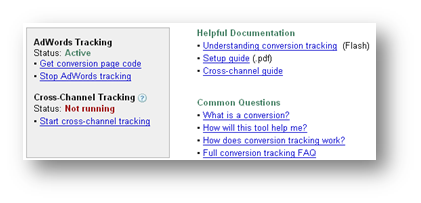
Setting this tool up is really quite easy. Within your AdWords account, go to the Tools section and click through on Conversion Tracking. At this point you will quickly notice a grey box dictating that AdWords Tracking is active (if you’re already using conversion tracking) and that Cross-Channel Tracking is not running. To begin setting things up follow the Cross-Channel link.
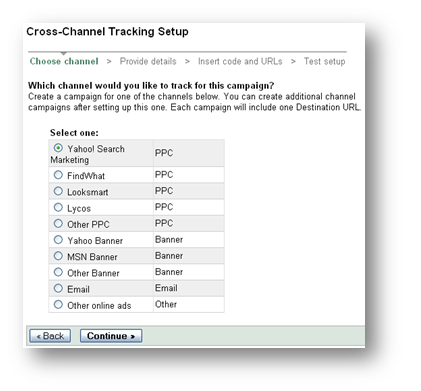
You will first be prompted to choose what channel you are advertising through. There are a few default choices like Yahoo!, LookSmart or Lycos. But also included are general choices for PPC, banner and email. At this point you’ll be instructed to name your campaign (i.e. Adbrite Blue Widgets) and enter a destination URL.
Once you continue, Google will generate a custom tracking URL for use with this specific campaign. At this step you will also be given the tracking code to be placed on your landing page, which incidentally is whichever address you entered for your destination URL (this is very important to note – I missed this sentence in the set-up documentation and learned the hard way).
Once these pieces are in place, you’ll be ready to start tracking your campaign(s). The performance data will be placed on your AdWords Campaign Summary page under the heading “Cross-Channel Campaigns.” There seems to be no limit to how many campaigns you can track in this method. Just keep in mind that each campaign tracked will require a new and separate tracking URL/java script code, so plan accordingly.
I currently use this tool for one of my clients who tends to necessitate a diversified portfolio of PPC search engines. I find it to be a great time saving tool for accessing the most immediate conversion performance data. However, I will admit that the system has its flaws. In regards to tracking clicks, this system is not pin point accurate.
For the past seven days, I have recorded a 27% variance between what Google (higher) and what my Business.com (lower) campaign has tracked for clicks. So far conversions have been on track. Yet another point to ponder is that this system potentially gives Google a massive amount of information about your advertising activities and the performance of other search engines for your advertising niche. I’m not usually a Google conspiracy theorist, but this is worth considering.
Has anyone else found success with this tool? Have you found a discrepancy in tracking accuracy as well? Does this give Google too much of a competitive edge?
