


Welcome to the second article in our PPC Hero Series, How I Manage A PPC Account With/Without ___________. If you missed Sarah’s post about how to handle Low Search Volume, you must to go straight to jail and not pass go – and then check it out!
Today, I will give you the highlights on managing an account with a small budget. There are five golden rules that I live by to make my client’s small budget work each month.
Golden Rule #1:
Pay Attention to the Following
- Structure – A nice, tightly themed structure will do wonders when you don’t have a lot of money to spend. Campaigns with 3-5 ad groups housing 10-15 keywords work really well. This is important for a couple of reasons. First, the amount of data that you have to sift through to optimize the account is less. Second, if you work for an agency, it is likely that you have a maximum amount of time that you can work on the account before you no longer are profitable. Smaller, more succinct data sets let you optimize quickly and spend more time on bigger tasks in the account. Don’t miss our other PPC Hero Series on Starting An Account From Scratch to help you out here.
- Quality Score – This is one of the most important metrics to look at in my opinion in a small budget account; especially in Google. Google’s algorithm to calculate QS affects your bids. The better the QS, the more your keywords are eligible and the less you pay for your clicks. So, by creating a great account structure, making meaningful keyword choices and having relevant content on you landing pages, your QS should be stellar.
- Pause Under Performing Keywords – They are like the bad boyfriend that you just don’t want to give up, but should for the sake of your sanity. Don’t hold on to keywords that are costing you money and not converting. Just because they did well for you 6 months ago and have been terrible ever since doesn’t mean that they will make a comeback. Let them go. Pause them. Don’t waste your client’s money and let under performers ruin your solid metrics you have worked so hard for!
Golden Rule #2:
Use Branded Campaigns
- Pretty simple. Create a campaign that is just about your company, product or service. I have found that my branded campaign is sometimes my saving grace with a small budget account. Once you get them going, they work really well. They normally converted at high rates for low CPLs. Most searchers that type in branded terms are in the later stages of the buying cycle and are ready to convert. I am going to be more likely to convert on the phrase “Coach handbags” than I would just “handbags” if I have already made up my mind and done all my research.
Golden Rule #3:
Use the Free Things
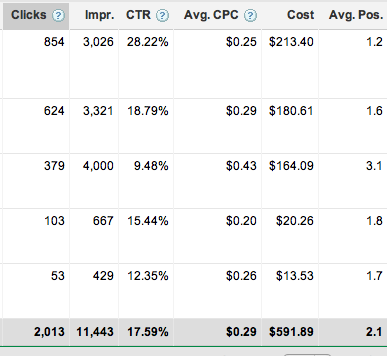
- Ad Extensions – These are my favorite! My small budget account has site links for all of its campaigns. They are easy to use, you get a lot of traffic from them and they give you the option of showing the depth of your site and what you have to offer searchers. Below is a screen shot of my Site Links metrics from adWords (the 28.22% CTR is on my branded campaign… Told you it worked!)
- Keyword Tools and Search Query Reports – Expand your account with these. You might just stumble upon a keyword that will bring in a decent amount of traffic at a lower cost. Also look for additional Negatives from your SQR reports. This is similar to pausing those under performers. Why waste money on keywords that simply don’t make money for your client? A colleague has a client who provides adoption assistance. She actually had to add “Amy Winehouse” to her negatives list in the account since there was a rumor that Ms. Winehouse was about to adopt a child before her untimely death. Again – this is a client with a small budget and money was just being wasted (no pun intended) on this search since it was not the kind of traffic they wanted to their site. Good job SQR!
Golden Rule #4:
The When and Where
- Day Parting – After your account has gathered ample data, run a report to see if your client could benefit from ad scheduling strategies. See what days and even what hours the most conversions are happening. Bid up during these times to increase the likelihood that your ads will show. Does your client not perform well on the weekend? My small budget client does not. You can help preserve your client’s money when the audiences are just not searching.
- Geo Targeting – Most clients that have a smaller budget are local to their area. The larger net you cast geographically, the more money you are going to spend getting out your message. Target the area that your client’s business services or sells to. Target the places where sales have grown. Why target nationally if you don’t need to. If your client sells pine nuts in Walla Walla, Washington and nowhere else, would you want someone in Rhode Island to click on your ad? (ok – if they were looking for a gift and the pine nuts were made by a company that shipped nationally, then yes…. But for all intents and purposes, the answer is no).

Golden Rule #5:
First Could Be the Worst and Second Might Be the Best…
- All of our clients think that they should be in ad position 1. “People won’t find us if we are 2nd or 3rd!” I am calling their bluff. My small budget client does VERY well in ad positions 3-3.5. And I am able to save them money by not paying for the high priced conversions. Why live in the penthouse and pay all that money if you have the same view on the 10th floor for less? Test this. Bid down your keyword CPC and drop to a lower position. Are you gaining conversions at a lesser cost? If the answer is yes, then keep your client there and explain your success! If no, then bump back up those bids and get back into position 1.
Those are my tips on optimizing an account on a small budget. How do you do it? Let me know your thoughts! Stay tuned tomorrow for Dave’s post on making an account work without the help of the big dogs…
