


I had a call with an MSN AdCenter rep the other day that showed me a pretty cool feature when using match types in MSN.
I had added keywords into MSN for a client of mine a while back using only broad match. When the MSN rep called me, they recommended I use additional match types. Okay, I do this in Google, why not try it in MSN? The cool thing about utilizing MSN match types is that once I add phrase and exact match into an ad group with my broad match keyword, it automatically breaks out traffic from the broad match keyword into what would have been phrase match or exact match.
For example, the keyword, ‘endoscopy’, broad match shows that during a 7 day span it generated: 1000 impressions and 200 clicks.
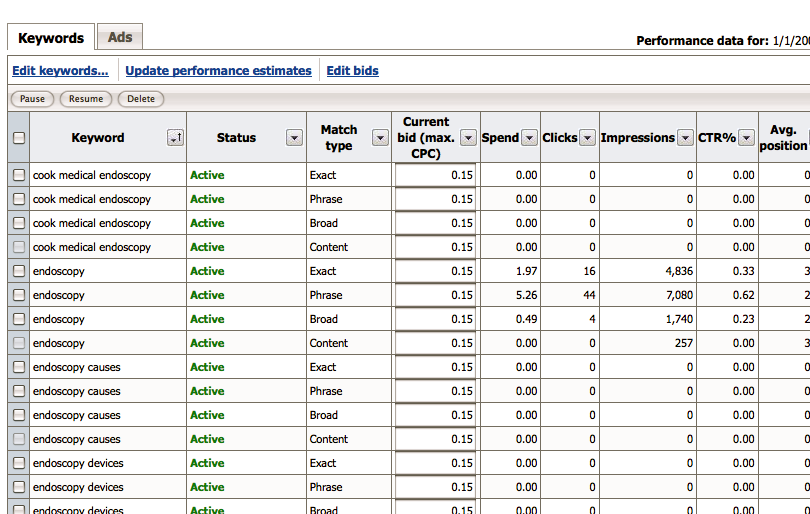
But once I added phrase and exact match of the keyword ‘endoscopy’ into the ad group, this is how MSN broke out my metrics:
Broad match: 700 impressions and 75 clicks
Phrase match: 200 impressions and 20 clicks
Exact match: 100 impressions and 5 clicks
So I could see that a majority of my traffic was coming from keywords that I didn’t have in my ad group. Why is this important? Instead of having to add the additional match types to the ad group and waiting a couple of weeks if not months to begin seeing how the traffic is attributed, you can get that information as soon as you add in the match types and hit save. This allows you to quickly determine which keywords should have their bids adjusted or if they should be paused. But it also tells you how users are finding your site and how qualified they are depending on which match type they came through. Rather than having to wait around for weeks or even months at a time to give your new match types a chance to generate clicks and leads, you now have this information immediately and can act on it as soon as you add them into your account.
So, it may not be a mind-blowing advancement for MSN but it is a cool feature that neither Google or Yahoo have.
To add additional match types to your MSN keywords, take the following steps:
1. Login to your MSN Adcenter account.
2. Click on the campaign, then ad group of the keywords you want to add additional match types to.
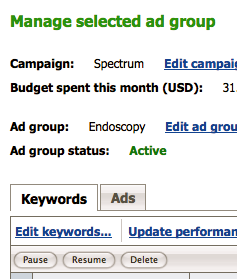
3. Make sure you’re on the keywords tab, then click on the link that says ‘edit keywords’ (see screen shot)
4. Next you want to cick on the check box that says ‘show match types’ (see screen shot)
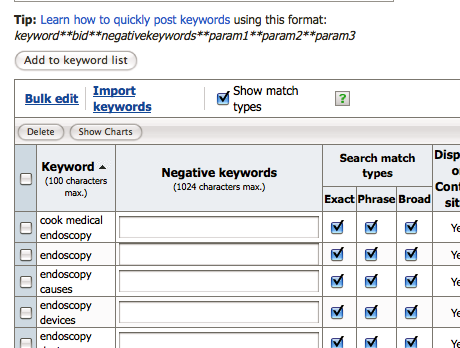
5. Once you click on ‘show match types’, MSN will automatically check all match types for each keyword in your ad group. If you want all match types hit ‘save’ at the bottom of the page and viola, your new match types have been added and it will show you right then the breakdown in key metrics for each match type. (see screen shot)
This is just one step MSN has made in the recent past to help improve your PPC campaigns. Has anyone else benefited from this feature?
