


Finally we’re getting more data about the search queries that trigger our ads to display in Bing.com. Google has had the search query report out for a while now, and Yahoo! has it but you have to request it personally from your Yahoo rep (if you have one). But now you can finally see raw search query data within your adCenter PPC account.
Search query reports show you the actual search queries that trigger your ads to show in the search engines results pages. Because you may have broad match keywords or even phrase match keywords, a user’s search query may not match exactly to what you have listed in your accounts. Therefore, this report will list common occurrences of a query that show your ads.
For example, you may have a broad match keyword in your PPC account for ‘pet album’ and MSN/Bing may end up showing your ad for, ‘pet store’ or ‘pet food’.
If you’re website doesn’t offer pet food or is not considered a pet store, you can add in these search queries as negatives – so the next time someone does type in ‘pet store’ or ‘pet food’ your ad will not show.
Advertisers can save a lot of PPC spend by running these search query reports regularly and adding in negative keywords that aren’t relevant to your product or services.
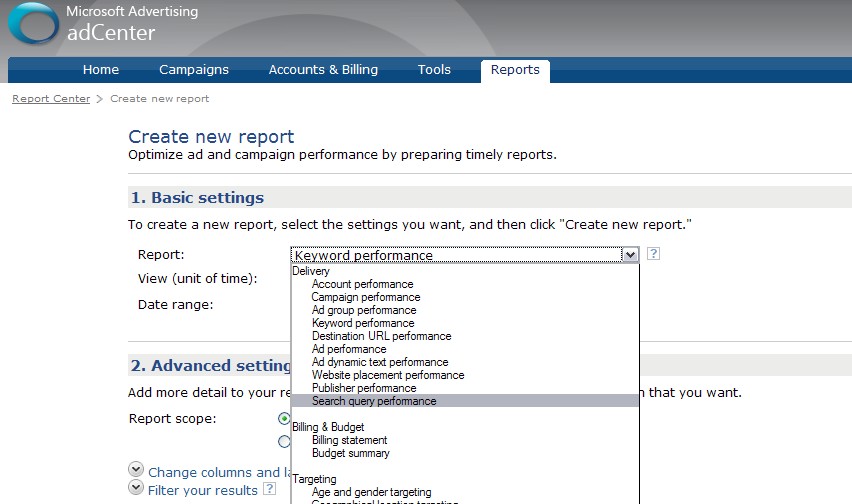
To run the search query report, simply go to the reports tab in adCenter, click ‘create a new report’, and using the drop down for report type, select ‘search query performance’.
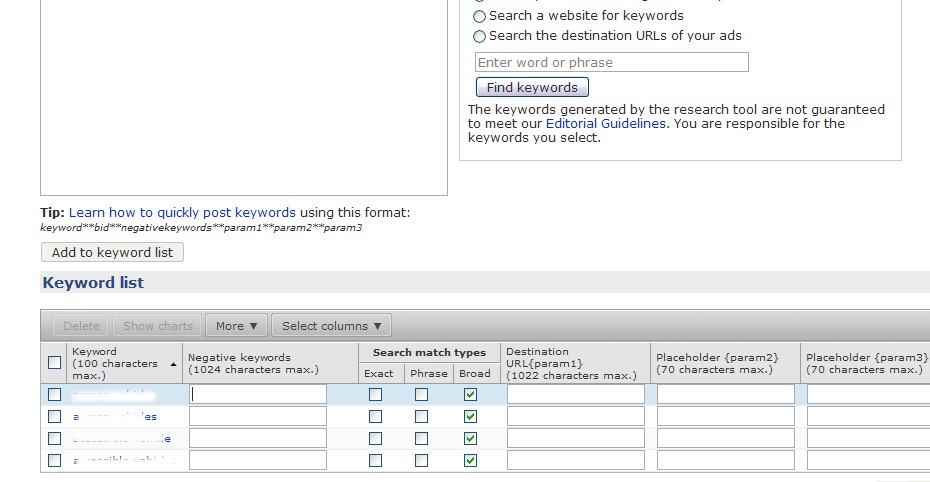
To add negative keywords to your adCenter account, simply click on a campaign, click on a specific ad group, click ‘add or edit keywords’, and add in negative keywords in the negative keywords column at the bottom of the page.
Hopefully, soon we’ll be seeing many more features coming out of MSN/Bing.com. But this is one feature that I know can help advertisers save money but not having their ads displayed for irrelevant search queries. Adding negative keywords is a great way to weed out unqualified traffic but still use broad match keywords.
