


A short while ago Google added some additional options in the campaign settings of your Adwords account. Since some of these settings and options can be confusing for experienced advertisers as well as newbies, I’ll go over these settings and give some recommendations on which ones you should opt in or out for.
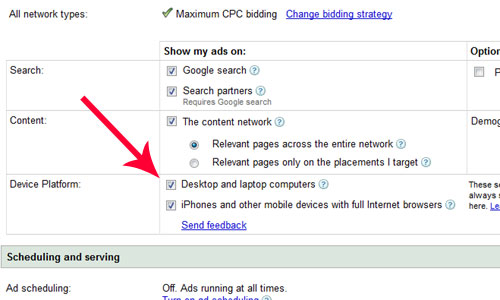
(click picture to enlarge)
Device Platform Settings:
Desk and laptop computers: This was the default settings prior to the change. However, Google now allows you to control where your ads are being shown at a more granular level. By selecting this option your ads will show as normal. If you were to opt out of showing your ads on desktop and laptop computers then you should be only choosing to show your ads on mobile phone devices like the iphone, blackberrys, etc.
iPhones and other mobile devices with full Internet browsers: Full internet browsers are browsers that can show a standard HTML page and can support shopping cart/checkout functions on e-commerce websites as well as tracking from Google analytics and other analytics programs. According to Google, there are currently only a small number of phones (mobile devices) that have a full web browser capability, but the trend is growing.
I would only recommend opting in for mobile devices if you know your target audience is among the group of people using the newer iPhones, T-Mobile G1 and Blackberry’s.
Ads that do target the iPhone and other mobile devices will be shown on Google web search and the Google Network.
What’s the difference between mobile ads and advertising on the iPhone and other mobile devices?
Mobile ads: This is an ad format that allows you to create mobile text and image ads. These kinds of ads will show on internet capable mobile phones and devices and can appear on Google mobile web search, the Google mobile search network and the mobile content network.
It’s important to know that Mobile ads will show regardless of what device platform settings you’ve chosen in your campaign. However, fewer characters are allowed in mobile ads than in standard text ads, and each ad must link to a mobile landing page.
iPhones and other mobile devices use your standard text and image ads to users of iPhones, T-Mobile G1s, and other mobile devices when they perform a Google search or browse relevant pages in the Google Network. “However, device platform targeting does not have some features that mobile format ads have, such as click-to-call functionality or carrier targeting”, says Google.
In order to determine if your phone has the capability to display a full web browser and support checkout features, you must check with the manufacturer of your phone.
I think it’s okay to select the option to display your ads on mobile devices in your campaign settings. This is mainly because you don’t have to create any additional ads or different kinds of ads in order for them to show on Google search. However, I do wish Google would add a report that will show you what kind of traffic you are getting via mobile platforms, and at that point you can determine whether or not to continue opting in to mobile devices. As soon as that reporting feature is available, I’ll be sure to let everyone know!
